2019年5月23日星期四

2019 Top recommented universal diagnose scanner V2018.3 Actia Multi Diag

2018 Multi-Diag Access J2534 Pass-Thru OBD2 Device is new arrival universal diagnostic tool from obd2cartool.com. 2019 New high performance equipment 2018.3 multidiag for diagnose all major brands. V2018.3 ACTIA MULti diag support multilanguage and more newer car models compared to ds150 vci scanner.


2017/2018 Multi-Diag Access J2534 Pass-Thru Multidi@g OBD2 Device
 multidiag


Here julie will share you some frequently asked questions from our customers before they are buying actia multidiag j2534 vci interface.


Q: is it right? that this ACTIA multidiag 2018.3 adapter works with the latest version of actia 3/2018 with need a interface with hex: 033918?
A: hello, dear friend, yes, obd2cartool.com multidiag adapter with s/n 033918.


Q: It is possible to can have a full Actia 3/2018 DVD included in that package? This would be fine.
A: hello, dear customers, yes, all our items together with full Actia 3/2018 DVD.


Q: you have something to give me (details about PCB, software anything changed between 2014 and 2018.3 ?
A: hello, dear friend, for pcb board you can direct to contact with email: obd2cartool@hotmail.com. New 2018 actia multidiag you can get to use, no need to do any reworked compared to 2011 multidiag.


Q: do you have free download actia multi diag interface Actia 3.2018 43.0 software?
A: yes, pls free download obd2cartool multidiag access j2534 here: https://mega.nz/#!QNskhKqY!q93QYap0xNayDMhO1Y0DRpf_OkpkYJQEgC0vnrPzfOM


Q: Which language does ACTIA V2018.3 Multi-diag Support?
A: Acita v2018.3 multi-diag support for: English/ Spanish/ German/ French/ Italian/ Portuguese/ Bulgarian/ Croatian/ Czech/ Danish/ Dutch/ Finnish/ Hebrew/ Hungarian/ Polish/ Romanian/ Russian/ Serbian/ Slovenian/ Swedish/ Turkish.


For more details information, welcome to Add my Whatsapp (+86 13537734676) or Skype (great2obd) if you have, Your Private Secretary in Car Repair Area! 16 Hours Online at your Service!


Julie Xiong
Email : obd2cartool@hotmail.com
Skype : great2obd
Whatsapp : 0086 135 3773 4676
Website : www.obd2cartool.com

2018年12月28日星期五

Vagtacho 3.01 opel immo interface install guide tips

Vagtacho 3.01 can be used to change mileage and Read PIN code. Opel Immo Airbag Reader support OPEL IMMO-1 IMMO-2 and AIRBag reset. Here julie will guide you how to solve vagtacho 3.01 opel immo usb to k-line interface not found error.


Vag Tacho 3.01 Opel Immobilizer AirBag Scanner Vagtacho mileage programmer

 vagtacho opel immo


Thanks for our valued customer sharing:


NOTE: This program works best with Windows XP. If using with Windows 10 (and possibly other, newer Windows OS), you will likely experience errors such as “USB not found,” “USB to K-line interface not found,” and VagTacho/Opel Immo opening and closing immediately, even if they briefly say “connected” in the top bar.


In order to have the best success possible using these tools, please find a way to use via Windows XP. Options include – 1) using an older machine with Windows XP already installed, 2) installing Windows XP on a Vista/7/8 machine for a dual-boot situation, or 3) using a “virtual machine” to run XP inside of a later OS. Prior to 10, Windows OS came with XP emulator included. On Win10, a 3rd party emulator is required.


Running a virtual machine on a Windows 10 machine worked very well when experiencing multiple errors. VMware can be used to emulate Windows XP disk image (.iso).


After setting up proper OS, FTDI drivers must be manually installed in order to use the program.
On WinXP, go into Control Panel  Device Manager, and scroll down to “Other Devices  USB <-> ISO Interface” (with yellow ! symbol)
Right click, select “Update Driver”
Do not let Windows automatically select driver. You must do it manually – select “No, not this time.”
Select “Install from a list or specific location (Advanced)”
Select “Don’t search. I will choose the driver to install.”
You will then have to browse for the driver to install. Go to folder where VAG Tacho 3.01… is located (likely installation CD included with cable) and select the file with name similar to “ft2xxx”
Install this driver.


VagTacho will now work as intended.


Steps are similar for other Windows OS, but will likely have trouble with drivers, as this cable & software is designed for WinXP.


For more details information, welcome to Add my Whatsapp (+86 13537734676) or Skype (great2obd) if you have, Your Private Secretary in Car Repair Area! 16 Hours Online at your Service!


Julie Xiong
Email : obd2cartool@hotmail.com
Skype : great2obd
Whatsapp : 0086 135 3773 4676
Website : www.obd2cartool.com
2018年12月21日星期五

Step by step guide you to use renault com diagnostic interface for renault DACIA

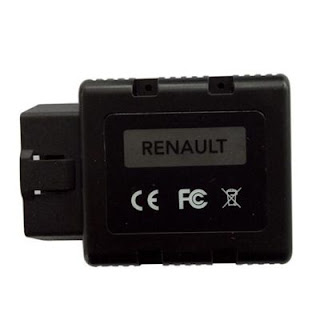
Renault-COM interface is a perfect replacement of Renault Can Clip. Renault com Bluetooth Diagnostic Scanner can access to various ECUs such as Engine, Gearbox, ABS, Airbag/SRS. Here OBD2CARTOOL Julie will show you how to successfully diagnose Renault Dacia with Renault-COM.


Renault-COM Auto Scan&Programming Bluetooth for Renault vehicles
 renault com interface


Device: Renault-COM Bluetooth Diagnostic and Programming Tool

Vehicle: Renault Dacia

You can use it to display identification, read and clear fault codes, display and record measured values and perform actuator tests in multi-languages.


Following the procedure:

Insert Renault-COM interface to vehicle 16pin obd port, and pair with computer via Bluetooth (visit our official blog to get step-by-step installation guidance)

Run SuperScan application

Click “Diagnosis” on the main menu


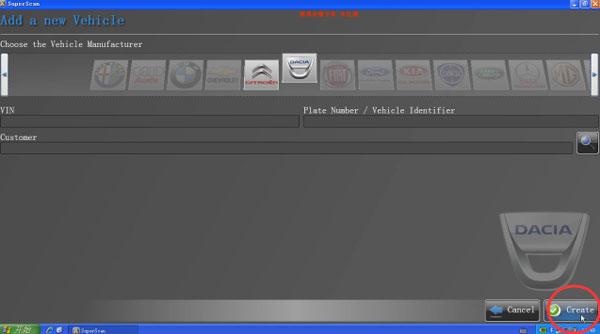
Then click “+New vehicle”


Choose “DACIA” icon and click “Create”


Analysing possible on-board systems, wait…

Choose “ENGINE ELECTRONICS” and click “Connect” to continue


Detecting ECU…

Connecting to the ECU…

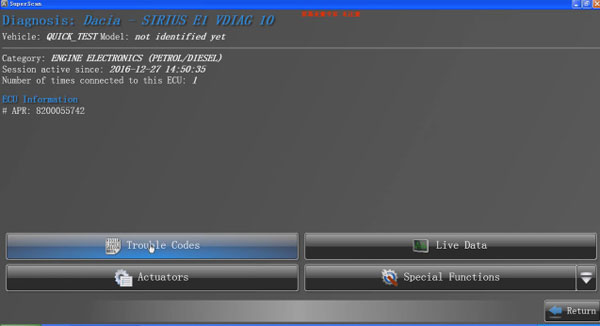
This is menu incl. Reading trouble codes, reading Live data, special functions

Here we choose “Live Data” first


Analysing live data parameters…

The software will show you the live data


Next click “Return” to go back to functions menu, choose “Trouble codes”


All right, all trouble of DACIA codes are displayed on the screen


Then Fault code clearing, you can use Renault-COM to store DTC vehicle history forever

Done!


For more details information, welcome to Add my Whatsapp (+86 13537734676) or Skype (great2obd) if you have, Your Private Secretary in Car Repair Area! 16 Hours Online at your Service!


Julie Xiong
Email : obd2cartool@hotmail.com
Skype : great2obd
Whatsapp : 0086 135 3773 4676
Website : www.obd2cartool.com

2018年12月19日星期三

How to update FRM VAG COM 18.2 to VCDS 18.9 newer version

Vagcom 18.2.1 HEX CAN USB Interface VAG COM 18.9.0 cable VCDS 17.8.1 online update version 16 multilanguage


 vcds online updatable cable
Step 1: Please download VAG COM 18.9.0 FRM or En newer software from official website
Step 2: Uninstall VCDS 18.2.1 old version, then as obd2cartool CD guide to install vag com 18.9.0 newer version on computer
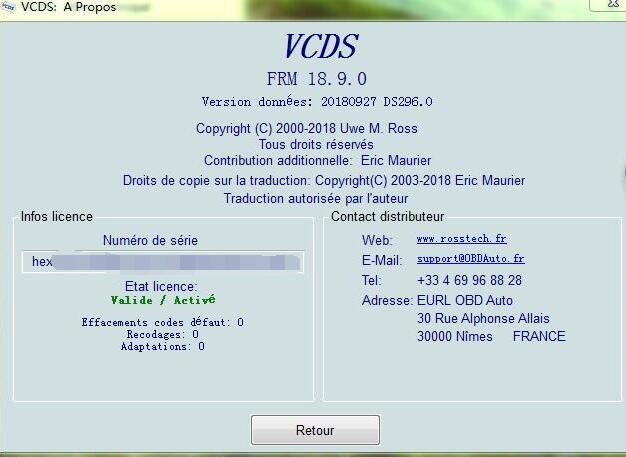
Step 3: Still use the first time actived license to register the interface, still work newer version.
Done!!


VAG COM 18.9.0 software free download link:

obd2cartool Stable and effective VAG COM 18.9.0 update online version, you can save a lot of money.

For more details information, welcome to Add my Whatsapp (+86 13537734676) or Skype (great2obd) if you have, Your Private Secretary in Car Repair Area! 16 Hours Online at your Service!


Julie Xiong
Email : obd2cartool@hotmail.com
Skype : great2obd
Whatsapp : 0086 135 3773 4676
Website : www.obd2cartool.com

2018年12月13日星期四

2018 HQ DS150E VCI DELPHI 2015R3 download Autocom CDP TCS Free Keygen Activation

New DS150E VCI Supports faster diagnosis on around 54,000 systems on more than 4,000 models from over 48 vehicle manufacturers. OBD2cartool.com NEW VCI DS150E Full system coverage for BMW, VAG, Ford, Peugeot, Citroen, Renault, Vauxhall, Rover, Fiat, Volvo, Mazda, Mercedes, Smart, Nissan, Subaru, Toyota, Hyundai... and more! OBD2CARTOOL HQ delphi ds150e with real 9241a green pcb board v3.0 support for old bmw and ford car models. Highly recommented!!!


HQ 9241 New VCI DS150E Diagnostic tool Ds150e scanner support Autocom Delphi Software

 ds150e new vci


Requirements:

- O.S.: Windows 7, Windows 8, Windows 8.1
- CPU: Pentium/Athlon Dual Core or higher
- RAM: 4 GB of system memory
- Hard Drive: 4 GB of available space
- Screen with resolution 1440 x 900 or better
- Bluetooth or USB interface
- DVD-ROM
 ds150 2015r3 software


NITROFLARE.COM - INTERCHANGEABLE LINKS (1 GB) THANKS FOR LINK SHARED BY GARAGE.


http://nitroflare.com/view/52DB0BB63DC28F3/DELPHI.2015.R3.Cars.and.Trucks.part1.rar
http://nitroflare.com/view/D75542BC0C4615B/DELPHI.2015.R3.Cars.and.Trucks.part2.rar
http://nitroflare.com/view/1349527B8966AEB/DELPHI.2015.R3.Cars.and.Trucks.part3.rar
http://nitroflare.com/view/6ECCC4FB6C60841/DELPHI.2015.R3.Cars.and.Trucks.part4.rar


THANKS FOR Other activation method SHARED BY Pascal.


1 - Replace ( Main.exe ). take those of Cars and Trucks 2014.R2 2014.R2

2 - In the records of Cars and Trucks 2015.R3 2015.R3

3 - Executed the Main.exe file

4 - Save the file FileActivation.xml 'Yes' on the desktop

5 - Close the software ' Abort '

6 - Use the Keygen and take office FileActivation file

7 - Once Activation OK

8 - Copied the FileActivation file office in installation folders Cars and Trucs

9 - Restart Main.exe the Cars folder, launch start , and used FileActivation The file you just copied.

10 - Make the name thing with the file Trucks

11 - Go to each folder delete the file ' wyUpdate ' canceled for the second request for update .

12 - And Voila!


For more details information, welcome to Add my Whatsapp (+86 13537734676) or Skype (great2obd) if you have, Your Private Secretary in Car Repair Area! 16 Hours Online at your Service!


Julie Xiong
Email : obd2cartool@hotmail.com
Skype : great2obd
Whatsapp : 0086 135 3773 4676
Website : www.obd2cartool.com
2018年10月10日星期三

Latest 18.9 vcds vagcom newer version V18.9 vag hex can usb released

OBD2cartool new released v18.9 vagcom vcds vag diagnostic interface. Vagcom hex can usb is our online updatable version from Vagcom 18.2.1 HEX CAN USB Interface. VAG COM 18.9.0 cable VCDS 17.8.1 online update version support for 16 multilanguage.


Vagcom 18.9 HEX CAN USB Interface VCDS 18.9 online update version 16 multilanguage


 vag hex can 18.9


VAG COM 18.9.0 Features:


1. The product can use the official software and update online, so you can always get the newest software version( VAG COM 18.9.0 french already update, other version is 18.2 or 17.8.1 ).
2. You can get access to Internet when using this product and not easy be locked.
3. This product can support long coding,fast scanning fuctions.
4. It supports 16 Languages.( Support 16 languages, including of Chinese, English, French, German, Russian, Italian, Swedish, Danish, Czech, polish, Dutch, Hungarian, Portuguese, Spanish, Slovenia, Romania.)
5. It supports Firmware update online ( not NEC project), always the newest version.


obd2cartool Stable and effective VAG COM 18.9.0 update online version, you can save a lot of money.


For more details information, welcome to Add my Whatsapp (+86 13537734676) or Skype (great2obd) if you have, Your Private Secretary in Car Repair Area! 16 Hours Online at your Service!


Julie Xiong
Email : obd2cartool@hotmail.com
Skype : great2obd
Whatsapp : 0086 135 3773 4676
Website : www.obd2cartool.com

Install Tips of FLY FVDI 2018 full FAQs FVDI 2018 abrites commander

FVDI 2018 Commander is new update version from fvdi 2014 and fvdi 2015 version. Latest FLY FVDI 2018 ABRITES Commander works more stable than old version and loads no problrm on win xp, win 7, win 8 and win 10. Today julie will share you some installation guide and tips for your reference.


FLY 2018 FVDI Abrites Commander latest FVDI2018 full update from fvdi2016 vvdi2

 FLY FVDI 2018


Q1: What’s the difference among FVDI 2018, FVDI 2015 and FVDI 2014?
A1: Version 2018 has 2 features in addition to 2015 or 2016 and will not be blocked by 2015.


Q2: I have a problem that when starting error( FVDI 2018 commander loader v2) is displayed with device deactivated and connect server failed.


A2: The Quick Loader V2.0 is out of service, have to reinstall loader V3.0 software!! fvdi 2018 V3.0 LOADER Download LINK: https://mega.nz/#!KRBzVIrD!uE0ZGjYAbTv0sEZPQjLN0jejex_yI0IF9R3Wad21f7g

Or without Internet —C /Program X86-Abrites -open folder with mark where the loader is and start Loader from there.


Q3: The program cannot start because mfc110u is missing. Dll on the team. Internet reinstall the program to correct the problem.


A3: Mfc110u.dll errors are caused by situations that lead to the removal or corruption of the mfc110u DLL file, which is a file associated with Microsoft’s Visual Studio software.. please find the “patch” in installation folder, install all the files in “Patch” folder; the problem will be solved; Go to the software installation folder, you’ll find the patch folder, install all files in the folder: C:\ program files (x86)\abries \ patch


Q4: Have software installation problem with V2018 FVDI? Device not opened? Spawn app failed:1?


A4: Close antivirus software; connect FVDI to computer via USB; You should connect FVDI to computer before software installation; Reinstall the driver manually to solve the problem USB driver files locate in installation folder “USB interface”.


For more details information, welcome to Add my Whatsapp (+86 13537734676) or Skype (great2obd) if you have, Your Private Secretary in Car Repair Area! 16 Hours Online at your Service!


Julie Xiong
Email : obd2cartool@hotmail.com
Skype : great2obd
Whatsapp : 0086 135 3773 4676
Website : www.obd2cartool.com

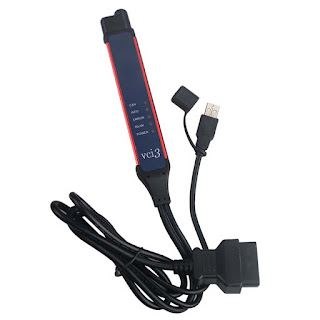
Why recommend V2.60.1.7 Scania VCI 3 SDP3 Scania Trucks & Buses?

 For scania heavy duty diagnostic tool, which do you suggest? I wanna to get one scanner support for all Scania Trucks, Buses, and other Hea...